


Neutrino Design - Human Design
4.149.00 Reviews
App Specs
- Version
- 10.53
- Updated On
- License
- Free
- Downloads
- 10,000+
- Developer
- BitStream LTD
- Categories
- Lifestyle
- Platform
- Android
Screenshots
 Analysis by AppCompare
I approached Neutrino Design - Human Design as a beginner rather than someone already familiar with Human Design terminology, and that made a big difference. The app is built around Neutrino Design, a system that presents Human Design in detail, so the first experience can feel more like opening a reference book than using a casual lifestyle tool. Once I slowed down and treated it as a guided self-reflection app instead of a quick personality quiz, its purpose became much clearer.
Developed by BitStream LTD, this free lifestyle app is aimed at people who want to explore Human Design from a mobile device. It is available for Everyone and works on Android devices running 8.0 or later. The current version is 10.53, and its presence on the store has grown to over ten thousand installs. I also noticed that its average sits at 4.1 from roughly two hundred ratings, which suggests a generally positive reception while still leaving room for different reactions to the subject and the way the information is presented.
The most important expectation to set is this: the app does not replace personal judgment, professional advice, or ordinary self-awareness. I found it more useful as a framework for asking better questions about habits, decisions, energy, and relationships. If you want a fast answer that tells you exactly what to do, the experience may feel slow or abstract. If you enjoy exploring a structured system and comparing its ideas with your own life, it has more to offer.
Getting from installation to a useful first reading
I’d begin by treating the first reading as a map of topics to explore, not a verdict about who you are. A useful next step is to pick one idea that feels relevant and test it against a small, ordinary decision over the coming days; that gives the material a fair chance without letting it make the choice for you.
What the first launch feels like
My first recommendation is to avoid opening it during a rushed moment. Human Design vocabulary can introduce several unfamiliar ideas at once, and skimming everything in a few seconds makes the app seem more complicated than it needs to be. I got more from it when I treated the opening session as orientation: understand what the app is trying to show, note the terms that seem important, and postpone interpretation until the basic structure feels familiar.
The app’s detailed approach is both its main attraction and its first hurdle. A short lifestyle app usually gives you a handful of broad statements and encourages you to move on. Neutrino Design instead invites a closer look at the system behind those statements. That depth can make the information feel more personal, but it also means the reader has to separate a useful observation from language that may sound convincing simply because it is specific.
I would keep a notes app or a small notebook nearby during the first session. That is not because you need to record every term. It is because writing down one or two reactions helps you test whether an idea actually connects with your routine. For example, instead of deciding immediately that a description is “accurate,” I would write, “This resembles how I handle unexpected requests at work,” or, “I do not recognize this pattern in my daily life.” That simple habit turns passive reading into active evaluation.
Worth Reading Before You Choose

Flipboard Shows What News Apps Must Do Beyond the Feed

Switching to Android Auto Means Rethinking Your Driving Routine

Google Calendar Makes a Crowded Week Easier to Manage

Ludo King Makes the Most of the Minutes Between Plans

Baby Panda World Brings Quick Play to Modern Phones, but Its Game Library Feels Busy

ESPN’s Live Game View Makes Following Close Games Easier
Setting up without overthinking the result
For a first-time user, the setup should be approached as a starting point rather than a final verdict about personality. Enter the information the app requests carefully, review it before moving on, and avoid treating a small typing mistake as meaningful. The quality of any personalized interpretation depends on the information used to create it, so accuracy at this stage matters more than speed.
I also suggest taking a screenshot or making a short written record of the initial result if the app presents several sections that you want to revisit. This is a practical workflow, not a claim about a special feature: it prevents you from trying to remember unfamiliar labels later and gives you something concrete to compare with your own observations. Returning to the same material after a normal day is often more revealing than reading it once while excited about a new app.
The free entry point makes experimentation easy, but the app includes in-app purchases ranging from $5.99 to $39.99 per item. I would not buy anything during the first few minutes. First decide whether the basic presentation is understandable, whether the subject genuinely interests you, and whether you are likely to return to the material. Paying for more depth only makes sense after you know that the style of interpretation works for you.
Your first meaningful action
The first successful action is not memorizing a Human Design chart or learning every technical term. It is choosing one everyday situation and using the app’s material as a prompt for observation. I used the idea of decision-making as a practical test: before agreeing to a small request, I paused, noticed my immediate reaction, and compared that experience with the language I had just read.
This approach keeps the app grounded. Suppose you are deciding whether to accept an extra task, attend a social event, or change a routine. Read the relevant part of your result, then ask yourself three plain questions: what did I feel first, what pressure was influencing me, and what happened after I acted? The goal is not to force the app’s explanation to fit. The goal is to see whether it helps you notice a pattern you normally overlook.
I found this especially useful when the reading was treated as a conversation starter rather than an instruction manual. A statement may remind you that you often make choices too quickly, avoid difficult conversations, or absorb the mood of a group. That does not prove the system is objectively describing you, but it can still lead to a worthwhile reflection. The best first result is a clearer question about your behavior, not a permanent label.
For a realistic daily scenario, imagine opening the app before a busy week and selecting one theme to observe. During the week, notice when you agree to something because you genuinely want it and when you agree because you feel cornered. At the end, compare those moments with the app’s interpretation. This gives you a small, repeatable experiment and prevents the experience from becoming a vague collection of impressive-sounding descriptions.
Where new users commonly get confused
The biggest source of confusion is language. Human Design discussions often use terms that sound technical, and the app’s detailed focus can make those terms appear important before you understand how they relate to one another. I would not try to learn the entire vocabulary in one sitting. Pick one section, translate it into everyday language, and only then move to the next.
Another common mistake is reading a detailed result as though every sentence has equal weight. Some parts may immediately connect with your experience, while others may feel distant or overly broad. That is normal. I recommend marking ideas in three groups: clearly useful, worth observing, and not convincing. This prevents confirmation bias, because you are giving yourself permission to disagree instead of collecting only the lines that feel flattering.
It is also easy to confuse reflection with prediction. I would be cautious whenever an interpretation seems to tell you what must happen, who you must be, or how another person will behave. The app works better when its content is used to examine choices and habits. It is a poor substitute for direct communication, evidence, or practical planning. If a relationship or work decision has serious consequences, use ordinary conversation and reliable information alongside any self-reflection tool.
Privacy is another reason to stay deliberate during setup. Because the experience is centered on personal interpretation, I would avoid entering someone else’s information casually or treating another person’s result as a way to analyze them without their involvement. The most responsible use is personal: explore your own reactions, discuss the ideas openly, and let other people decide whether they want to participate.
How to turn a first reading into a repeatable routine
After the first session, I would not open the app every time you face a tiny decision. That can encourage dependence on a framework instead of building your own judgment. A better routine is to choose one theme for several days, observe real situations, and return later to review what actually happened. This makes the app a reflection journal prompt rather than an authority that needs to approve each choice.
A useful method is to create a three-line entry after an important moment: “What happened,” “What I noticed,” and “What I will try next time.” The app supplies the language for the second line, but you supply the evidence. For instance, you might notice that you make better choices after sleeping on a decision, or that you change your mind when a group becomes enthusiastic. Those observations remain useful even if you eventually decide that Human Design is not the right framework for you.
This is one of the app’s less obvious strengths: detailed material can be valuable even when you approach it skeptically, because it gives you categories to test. The trade-off is that the same detail can encourage overanalysis. If you find yourself rereading interpretations without changing anything in daily life, close the app and do something practical. The point is to connect reflection with behavior, not to accumulate more descriptions.
Who will appreciate it, and who should skip it
I can recommend it to curious beginners who like personality systems, journaling, or guided self-reflection and who are comfortable forming their own conclusions. It may also suit someone who has encountered Human Design elsewhere but wants a mobile place to explore the ideas in more depth. The free download lowers the barrier to trying it, while the detailed orientation gives patient users more to examine than a one-screen quiz.
I would be more cautious about recommending it to someone who wants scientifically established psychological assessment, clinical guidance, or a direct solution to anxiety, relationship conflict, or career uncertainty. It is also not the best choice for people who dislike symbolic systems or become stressed when presented with many labels. In those cases, a straightforward mood journal, evidence-based mental health resource, or simple habit tracker may be a better fit.
Compared with a typical personality quiz, Neutrino Design feels less disposable because it encourages a longer exploration of one framework. Compared with a standard journaling app, it gives you an interpretive structure instead of a blank page. The compromise is that a quiz is easier to understand immediately, while a blank journal is more flexible and less likely to steer your interpretation. Choosing between them depends on whether you want a defined system or open-ended reflection.
What I would do before considering paid content
I would spend enough time with the free experience to answer three practical questions. Can I understand the main ideas without constantly feeling lost? Do the interpretations lead me to useful observations rather than just momentary recognition? Will I return to the app after the novelty fades? If the answer to all three is yes, paid items may be worth considering for someone who wants to explore further.
If the answer is no, spending more is unlikely to solve the underlying problem. A purchase cannot make an unfamiliar framework personally relevant, and more detail may increase confusion rather than reduce it. I also would not buy content because a description makes a bold promise about identity or destiny. The strongest reason to pay is sustained curiosity and a clear sense that the extra material supports a practice you already enjoy.
The app’s pricing structure means users should pay attention before confirming a purchase, especially if they are testing several lifestyle tools at once. I prefer to decide on a personal limit in advance and to judge value by how often I use the material meaningfully, not by how much content is available. That is a healthier standard for this kind of app than trying to “complete” the entire system.
My overall experience with the mobile format
Using Human Design on a phone has a practical advantage: the information is available when a real-life situation gives it context. I could read about a theme, put the phone down, and notice how it appeared during the day. That is more useful than reading everything in one sitting and expecting a complete transformation. The mobile format also makes revisiting a particular idea simple when I want a reminder.
The limitation is attention. A phone encourages quick taps, interruptions, and shallow reading, while this subject benefits from patience. I would use it in a quiet moment rather than between notifications. If the screen becomes tiring or the wording starts to blur together, stop. A shorter, thoughtful session is more valuable than forcing yourself through every available section.
BitStream LTD has positioned the app clearly around detailed Human Design rather than trying to be a general-purpose lifestyle dashboard. That focus is helpful because the experience has a recognizable purpose. It also narrows the audience. Someone looking for reminders, exercise tracking, meditation timers, or broad wellness tools will probably find a different category of app more practical.
After exploring it as a beginner, I see Neutrino Design - Human Design as a reflective companion, not a decision-making machine. Its strongest use is helping you slow down, name a pattern, and test that pattern against ordinary experience. Its main friction is the learning curve created by specialized language and the temptation to treat detailed interpretations as facts about your identity.
My advice is to start free, enter your information carefully, choose one everyday theme, and keep your first experiment small. Give the app a few real situations to prove its usefulness before considering any in-app purchase. If you enjoy structured self-exploration and can hold the interpretations lightly, it is worth trying. If you need practical tracking, clinical support, or clear evidence-based guidance, I would choose a more direct alternative. Used with that boundary, this lifestyle app can become a thoughtful prompt for self-observation rather than another source of noise.
Pros
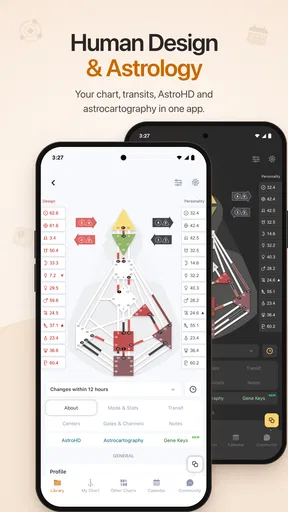
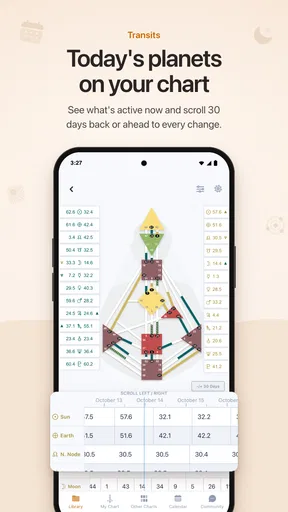
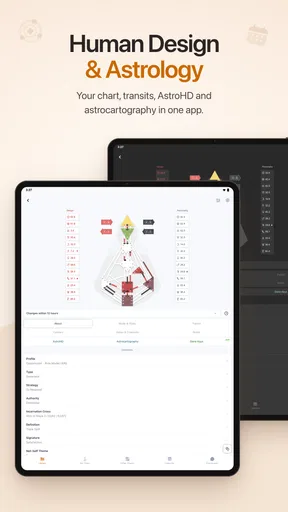
- Clear bodygraph charts make complex Human Design details easier to explore.
- Personalized readings can help users reflect on habits
- decisions
- and relationships.
- Useful reference for learning centers
- channels
- gates
- and profile meanings.
- Clean interface supports quick access to charts and saved personal information.
- Suitable for both Human Design beginners and users with prior knowledge.
Cons
- Interpretations may feel generalized rather than tailored to individual circumstances.
- Some advanced content or features may require a paid subscription.
- The app’s value depends on accepting Human Design as a self-reflection system.
- Terminology can be overwhelming until users learn the basic Human Design concepts.
- Privacy details should be reviewed carefully before entering birth and personal data.
FAQs for Neutrino Design - Human Design
What is Neutrino Design - Human Design used for?
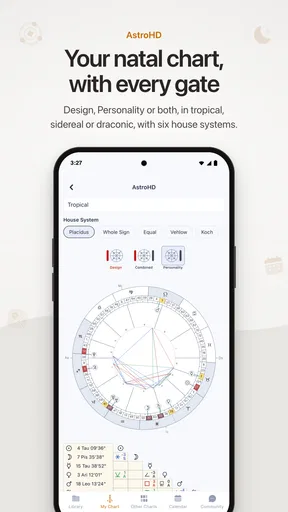
Neutrino Design - Human Design is an app for exploring the Human Design system, a self-reflection framework that combines concepts from astrology, the I Ching, chakras, and other traditions. After entering your birth information, the app presents a personal chart and interpretations intended to help you understand your energy patterns, decision-making style, relationships, and everyday behavior.
What information is required to create a Human Design chart?
The app generally requires your birth date, exact birth time, and birthplace to calculate a Human Design chart. The time of birth is especially important because even a small difference can affect certain chart details. If you do not know your exact birth time, you may still explore the app, but the resulting reading could be less accurate or some interpretations may change.
Does Neutrino Design provide personalized readings or only basic chart information?
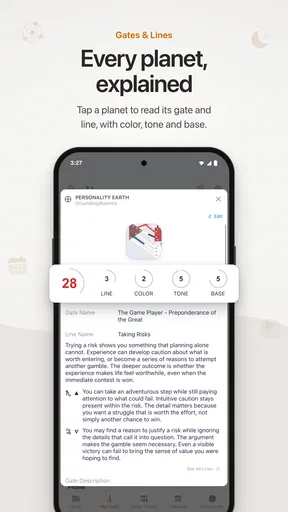
Neutrino Design typically goes beyond displaying a basic bodygraph by offering explanations of elements such as your type, strategy, authority, profile, centers, channels, and gates. The amount of detail may depend on the selected section or subscription plan. While the interpretations are personalized to your chart, they should be viewed as guidance for reflection rather than scientifically verified psychological or medical advice.
Is Neutrino Design - Human Design free to download and use?
The app may be available to download at no initial cost, but some advanced readings, detailed reports, compatibility features, or additional content can require in-app purchases or a subscription. Before confirming a trial or payment, review the pricing, renewal terms, and cancellation instructions shown in the relevant app store. Availability of features and prices can vary between Android and iOS.
Is my personal birth information safe when using the app?
Because the app uses birth date, time, and location to generate a chart, users should review its privacy policy before entering personal information. Check what data is stored, whether it is shared with service providers, and how account deletion works. Avoid entering information about other people without permission, and use the official Google Play or App Store listing when downloading the application.


